Free vs Paid Copilot: Which One Does Your Business Need?
Updated on November 17, 2026 · 6 min read
The short answer
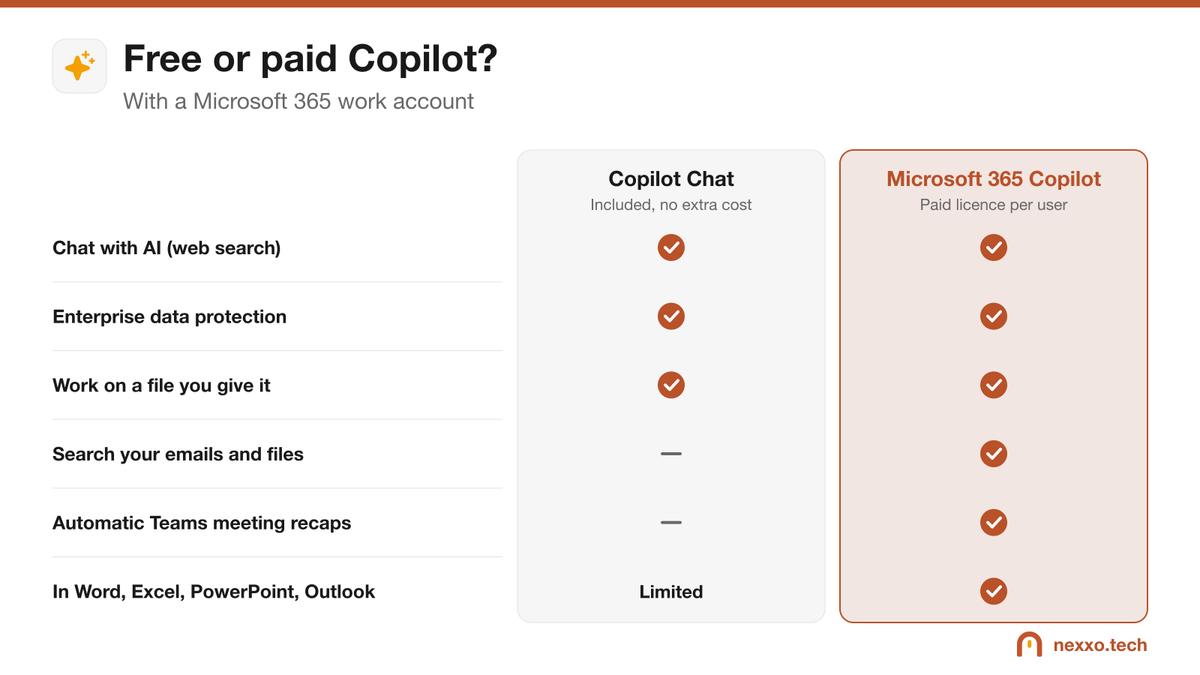
With a Microsoft 365 work account, Copilot Chat is included at no extra cost: it answers questions, works on files you give it and protects company data. Microsoft 365 Copilot, a paid licence per user, goes further: it searches your emails, files and meetings, and works directly in Word, Excel, Outlook and Teams.
"Copilot" now refers to several Microsoft products, and the confusion is common. For a business, the real question is simple: is the version included with Microsoft 365 enough, or do you need to pay for licences? Here is what each version does, and how to decide.
Copilot Chat: included with Microsoft 365
Every user who signs in with a Microsoft 365 work account has access to Microsoft 365 Copilot Chat at no extra cost. You will find it in the Microsoft 365 Copilot app, in Teams, in the Edge browser and at m365copilot.com.
- It answers questions using the web, like a research assistant.
- It drafts, summarizes, translates and rewrites text.
- It works on files you attach: summarize a report, analyse a spreadsheet, compare two documents.
- It has enterprise data protection: your prompts are not used to train the models and stay covered by Microsoft 365's commitments.
Its limit: it does not know your work environment. It does not read your emails, meetings or OneDrive and SharePoint files, except the ones you give it.
Microsoft 365 Copilot: the paid licence
Microsoft 365 Copilot is a monthly licence per user, added to the Microsoft 365 subscription. It gives access to your work data, respecting everyone's permissions:
- "Summarize this week's emails from client X" or "What was decided in Tuesday's meeting?": it searches your emails, chats, meetings and files.
- In Teams, it summarizes a meeting, lists decisions and tasks, and answers questions from latecomers.
- In Outlook, it summarizes a long thread and drafts a reply.
- In Word, Excel and PowerPoint, it creates a first draft from your documents, analyses data or builds a presentation.
How to choose for your small business
- Start with Copilot Chat for everyone. It is free and protected. Show your teams how to use it and how to write a good prompt.
- Spot the heavy users. People who spend their days in email, meetings and documents (management, sales, administration) benefit most from the paid version.
- Test with a few licences. Buy two or three licences for a few months, measure the time saved, then decide whether to expand.
- Clean up first. Microsoft 365 Copilot sees everything a user is allowed to see. If SharePoint folders are too open, it will find them. Reviewing permissions is a step not to skip.
What about consumer Copilot or free ChatGPT?
The consumer version of Copilot (with a personal Microsoft account) and free versions of other AI tools do not offer the same protection commitments as the business version. In Quebec, Law 25 governs how personal information is shared: avoid pasting client or employee data into them, and use the version tied to your work account.
Frequently asked questions
Is Copilot Chat really free?
Yes, for users who sign in with a Microsoft 365 work or school account. Some advanced agents may be billed per use, depending on how your organization is set up.
Is my data used to train the AI?
With a work account, Copilot Chat and Microsoft 365 Copilot are covered by Microsoft's enterprise data protection: your prompts and responses are not used to train the models. That is not necessarily true of consumer versions of AI tools.
How do I know I'm in the protected version?
Sign in with your work account. A shield icon or an enterprise data protection notice appears in Copilot Chat when the protection is on.
How much does Microsoft 365 Copilot cost?
It is a monthly licence added to each user's Microsoft 365 subscription. Microsoft adjusts its small-business offers, so ask your provider for the current Canadian price before buying.